Vision Board for Work
Vision Board for Work
How to bring a vision board into working life without it feeling awkward, on your own or with a team.
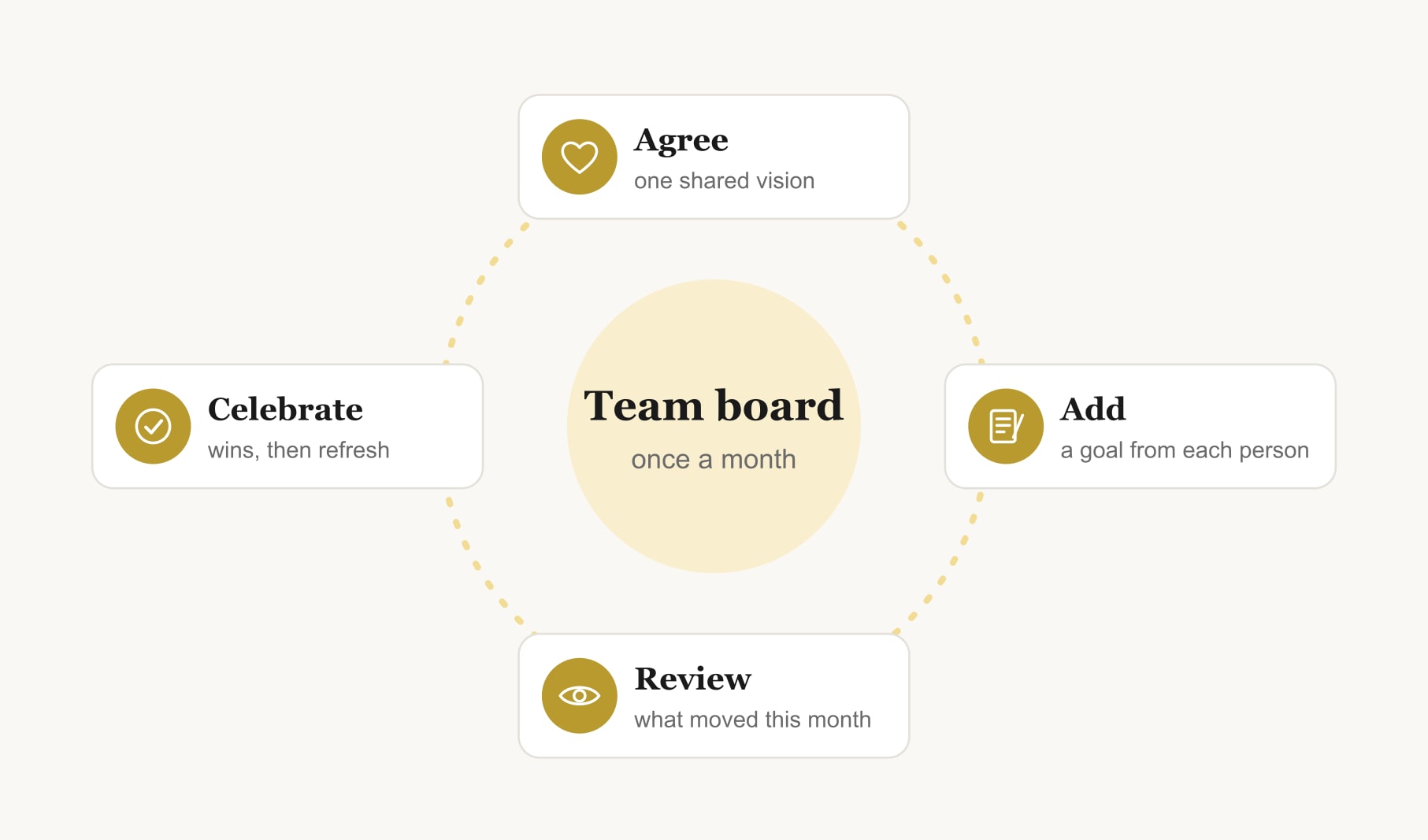
A vision board for work can be a private board at your desk or a shared team board. For yourself, keep three work goals with dates somewhere you see them daily. For a team, agree one shared vision, let each person add a goal, and review the board together once a month.

A vision board for work can feel a bit exposing. Pinning your dreams next to your monitor is not everyone’s idea of professional. But done quietly and well, a work board is one of the most useful tools I know, whether it is yours alone or shared with a team.
If you are looking for what to put on it, my list of vision board ideas for work covers that. This guide is about how to use one at work.
How do you use a vision board for work on your own?
Keep it small and specific: three goals, each with an image, a date and a first step. One for your daily work, like two focus hours each morning. One for growth, like a course. One for balance, like leaving on time twice a week. Put it where you see it while working. If a board on your desk feels too public, make your laptop wallpaper a photo of it, or keep it as a note on your phone.

Is it professional to have a vision board at work?
A tidy board with thoughtful goals reads as focused, not frivolous. Keep anything very personal off a shared space, and if you are unsure, keep it digital. Plenty of companies already publish a vision statement describing where they want to go. A vision board is simply a visual, personal version of the same idea.
How do you make a team vision board at work?
Start with one shared question: where do we want this team to be in a year? Agree a few words or images for the shared vision first. Then let each person add one goal of their own that serves it, with a first step. Review the board together once a month: what moved, what is stuck, what needs help. A team vision board template gives you a grid to start from.
Two rules keep it healthy. Nobody is judged on their square, and personal goals stay optional. A team board should build trust, not become another performance review.
What does a good personal vision board for work look like?
Mine, most seasons, has four squares. A clear desk: two focus hours before lunch, first step, turn off notifications at nine. A course page: finish the module by the end of the month, first step, book Tuesday evening. A walking path: a proper break at lunch. And a closed laptop at dusk: logged off by six on three days. Nothing on it would embarrass me if a colleague walked past, and all of it makes my working week better.
What should you avoid on a vision board for work?
Anything you would not want your manager or a colleague to see, if the board is on show. Salary figures, frustrations with specific people and job-hunting plans belong in a private board, not a desk board. Avoid goals that depend entirely on someone else’s decision, like “get promoted by June”, unless you pair them with the parts you control, such as “complete the leadership course” and “ask for feedback every month”. And avoid clutter: a work board with fifteen goals competes with your actual to-do list.
How do you make a vision board for work if you want a new job?
Keep that board private and make it about the move. One image for the kind of work you want, one for the skill that gets you there, one for the conversations you need to have. First steps might be updating your portfolio, messaging two people in the field and applying for one role a week. Keep a second, gentler square for doing the current job well, because leaving on good terms is part of the plan.
Can remote teams use a vision board for work?
Yes, and they often enjoy it more. Build the board in a shared document or a browser tool during a call, give everyone ten quiet minutes to add their square, then talk through it. Save the result and open it at the start of each monthly meeting.
How do you keep a work vision board going?
Tie it to a rhythm you already have: a Monday planning slot for your own board, a monthly team meeting for the shared one. Track the small weekly actions in a goal tracker for your vision board, and refresh the board each quarter. If you run your own company, my business vision board ideas go deeper on the founder side.
Keep reading
Vision board for work: your questions
A vision board for work is a visual set of your professional goals, such as skills, projects and routines, kept where you see it while working. It can be personal and private, or shared by a team to show a common direction and each member’s part in it.
A tidy vision board with thoughtful goals is appropriate in most workplaces. Keep very personal goals off shared spaces, and if you are unsure, keep your work vision board digital as a wallpaper or a private note instead of on the wall.
Agree a shared vision for the team first, then let each person add one goal with a first step that supports it. Review the team vision board monthly, celebrate progress and keep personal goals optional so the board builds trust rather than pressure.
Good goals for a work vision board include one daily routine, such as focus hours, one growth goal, such as a course, and one balance goal, such as leaving on time. Add an image, a date and a first step to each so the board drives action.
Yes. Remote teams can build a vision board for work in a shared document or browser tool during a video call, giving everyone quiet time to add a square before discussing it. Save the board and open it at the start of monthly meetings.
Review a personal work vision board weekly and a team board monthly. Weekly checks keep your own goals moving, while monthly team reviews give enough time for real progress to show. Refresh either kind of vision board every quarter as your priorities and projects change.
Managers can use vision boards to help teams see a shared direction and each person’s contribution. Keep participation voluntary, avoid judging anyone’s square, and treat the vision board as a regular conversation starter rather than a performance tool or a test.
Keep your vision board alive
A board built in your browser resets when you close the tab. Vision Boardly saves your boards, reminds you as each vision date arrives, and tracks the habits and moods moving you toward them.
Get Vision Boardly Free